
Bitdsk Miner Management tools on PC
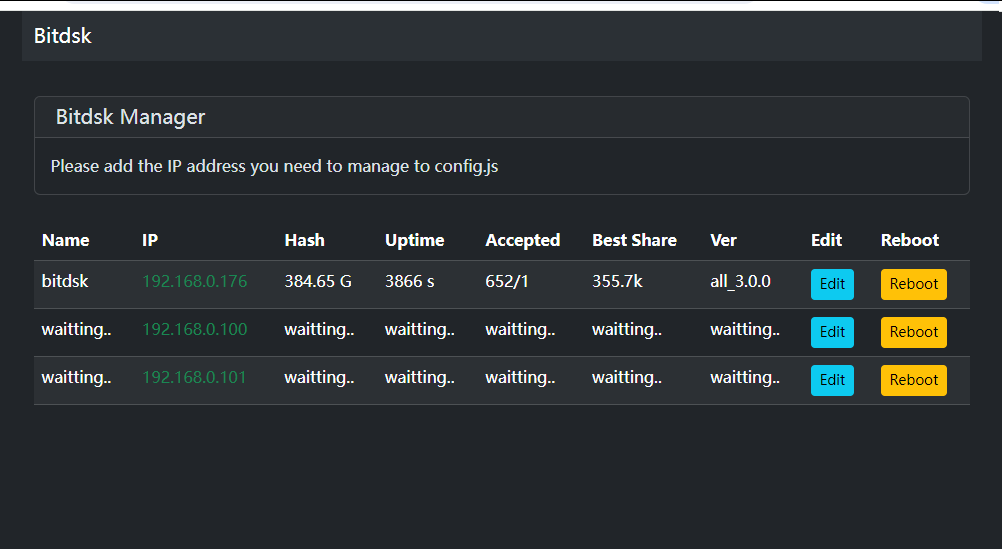
Windows batch manager for monitoring and upgrading several miners at once.
Every build, with file size and SHA256, is also listed in the firmware index. Requires miner firmware ≥ all_3.0.0.
What it does
- Lists every miner on your network in one table — name, IP, hashrate, uptime, accepted shares, best share and firmware version.
- Edit pool settings on a miner without opening its web UI in another tab.
- Reboot a board remotely.
- Works without internet — 1.0.2 bundles its resources.
Setup
- Unzip the release and open
config.js. - Add the IP address of every miner you want to manage.
- Start the manager. A row that does not answer shows as
waiting…until the miner responds.
Windows / Linux
| Released | Version | Notes | Download |
|---|---|---|---|
| 2025-06-11 | 1.0.2 | Bundles its resources locally, so it also works on a machine with no internet access. | Download |
| 2025-04-30 | 1.0.1 | Requires miner firmware all_3.0.0 or newer. |
Download |
| 2025-04-15 | 1.0.0 | Requires miner firmware all_3.0.0 or newer. |
Download |
Dates are the original publication dates carried over from the previous site.