Guide V1.0 Beta
Resources: Online Design Tool: https://www.bitdsk.org/u_ui_design
Download our designed UI https://www.bitdsk.org/ui-lab-for-u-series
First, you can refer to the image below to learn how to customize the UI.
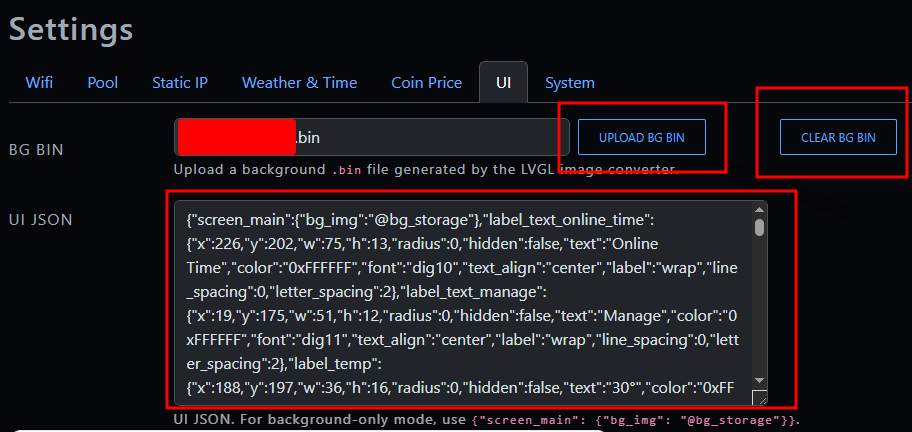
Create a background image (bg.bin).
The background image must be a 320px * 240px BMP file.
You can generate the bg.bin file using the Online Design Tool at https://www.bitdsk.org/u_ui_design. Please ensure the format is correct.
Let’s get started with our JSON design.
Simple Design Overview:
We need a bg.bin file and a snippet of JSON code to modify the UI.
If you only want to change the background, you will need to generate and upload the bg.bin file, then enter the following in the UI JSON field:
{"screen_main": {"bg_img": "@bg_storage"}}Once entered, simply save and restart.
Full Design Overview:
The entire UI is divided into four main interfaces: cont_main, cont_weather, cont_price, and cont_price2.
Each interface contains various elements, and you can customize their color, font, background, position, and more.
The table below lists all available elements:
| panel | id | Info |
|---|---|---|
| cont_main | label_text_online_time | Plain text “online time” |
| cont_main | label_text_manage | Plain text “manage” for manage ip |
| cont_main | label_temp | Label, output temperature |
| cont_main | label_version | blank |
| cont_main | label_win_num | Label, output Winning blocks num |
| cont_main | img_logo | img logo |
| cont_main | label_text_difficulty | Plain text “difficulty” |
| cont_main | label_acc_rej | Label, output accept and reject num |
| cont_main | label_best_share | Label, output best share |
| cont_main | label_online_time | Label, output online time |
| cont_main | label_pool_url | Label, output pool url |
| cont_main | label_manage_ip | Label, output manage_ip |
| cont_main | label_pool_difficulty | Label, output pool_difficulty |
| cont_main | label_text_best_share | Plain text “best share” |
| cont_main | label_main_hashrate | Label, output hashrate |
| cont_main | label_text_acc_rej | Plain text “acc/rej” |
| cont_main | label_tip | Label, output prompt text, such as hash test, CD key status. |
| panel | id | info |
|---|---|---|
| cont_weather | line_0du | a horizontal straight line |
| cont_weather | line_90du | A vertical straight line |
| cont_weather | label_weather_icon | Image showing the current weather |
| cont_weather | label_hashrate2 | Label, output hashrate |
| cont_weather | label_text_logo2 | text logo “bitdsk” |
| cont_weather | label_city | Label, output city |
| cont_weather | label_ymd | Label, output date |
| cont_weather | label_text_hash2 | Plain text “HASH” |
| cont_weather | label_week | Label, output week |
| cont_weather | label_text_temperature | Plain text “temperature” |
| cont_weather | label_temperature | Label, output temperature |
| cont_weather | label_weather_str | Label, output weather text |
| cont_weather | label_time2 | Label, output time |
| panel | id | info |
|---|---|---|
| cont_price | label_text_binance3 | Plain text “Binance” |
| cont_price | label_price_top | Label, output price of top |
| cont_price | label_text_hash3 | Plain text “HASH” |
| cont_price | label_p6 | Label, output Price in the 6th range |
| cont_price | label_p5 | Label, output Price in the 5th range |
| cont_price | label_p4 | Label, output Price in the 4th range |
| cont_price | label_p3 | Label, output Price in the 3th range |
| cont_price | label_p2 | Label, output Price in the 2th range |
| cont_price | label_p1 | Label, output Price in the 1th range |
| cont_price | label_hash3 | Label, output hashrate |
| cont_price | chart_price | price chart |
| cont_price | img_logo3 | logo |
| cont_price | label_coine_name3 | Label, output coin name |
| panel | id | info |
|---|---|---|
| cont_price2 | label_text_binanceprice | Plain text “Binance Price” |
| cont_price2 | label_text_hash4 | Plain text “HASH” |
| cont_price2 | label_hash4 | Label, output hashrate |
| cont_price2 | label_price5 | Label, output the price of the 5th coin |
| cont_price2 | label_price4 | Label, output the price of the 4th coin |
| cont_price2 | label_price3 | Label, output the price of the 3th coin |
| cont_price2 | label_price2 | Label, output the price of the 2th coin |
| cont_price2 | label_price1 | Label, output the price of the 1th coin |
| cont_price2 | label_price5_name | Label, output the name of the 5th coin |
| cont_price2 | label_price4_name | Label, output the name of the 4th coin |
| cont_price2 | label_price3_name | Label, output the name of the 3th coin |
| cont_price2 | label_price2_name | Label, output the name of the 2th coin |
| cont_price2 | label_price1_name | Label, output the name of the 1th coin |
| cont_price2 | label_text_logo4 | Plain text “Bitdsk” |
Available fonts
| dig10,dig11,dig14,dig15,dig16,dig20,dig40,dig65,dig80 | 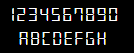 |
| sans8,sans9,sans10,sans12,sans14,sans16,sans20 | 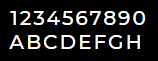 |
| disp12,disp16,disp18 | 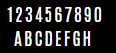 |
| lite15 | 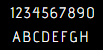 |
| serif11 |  |
Basic JSON format:
 {
   "screen_main": {
     "bg_img": "@bg_storage"
   },

   "label_pool_url": {
     "x": 97,
     "y": 219,
     "w": 117,
     "h": 19,
     "pad_top": 0, "pad_bottom": 0, "pad_left": 0, "pad_right": 0,
     "text": "pool.example.com",
     "font": "dig15",
     "color": "0xFFFFFF",
     "text_align": "right",
     "label": "scroll",
     "line_spacing": 0,
     "letter_spacing": 2,
     "bg_color": "0x002244",
     "bg_opacity": "60%",
     "hidden": false
   },

   "img_logo": {
     "x": 3,
     "y": 3,
     "w": 42,
     "h": 42,
     "rotation": 15,
     "hidden": false
   },

   "cont_main": {
     "add_label": [
       {
         "x": 12,
         "y": 8,
         "w": 120,
         "h": 20,
         "text": "textA",
         "font": "sans14",
         "color": "0xFFFFFF",
         "align": "left",
         "label": "clip",
         "line_spacing": 0,
         "letter_spacing": 1
       },
       {
         "x": 12,
         "y": 32,
         "w": 160,
         "h": 20,
         "text": "textB",
         "font": "sans12",
         "color": "0x00FF88",
         "align": "center"
       }
     ]
   }
 }
The following section, which is the beginning of the JSON, is used to trigger the use of the background image .bin file. If it is not included, the background image will not be loaded, and only the stylesheet will be applied.
   "screen_main": {
     "bg_img": "@bg_storage"
},Tip: We recommend compressing the UI JSON file when uploading it.